
Before searching property owner records, read this guide to understand how ownership searches work across all 67 Florida counties. Many users are unsure what property ownership records include, where to find specific details, and how to interpret the information. This guide explains the process and helps you use FL Parcel Point effectively.
How to Find Property Owner Records
FL Parcel Point provides the same search options across all 67 Florida counties, making it easy to find property ownership information regardless of the county you are searching. To look up a property’s owner, first visit the relevant Florida county page and open its property search tool. You can search using any of the following six options:

- Parcel Number: Search using the property’s unique parcel identification number.
- Owner Name: Enter the property owner’s first or last name.
- Address: Search using the property’s street address.
- ZIP Code: Find properties within a specific ZIP code.
- City: Search for properties located in a particular city.
- Advanced Search: Use additional search criteria to narrow down your results.
Choose the search option that matches the information you have and submit your search to find the relevant property records.
Switch to the Owner Option in the Report
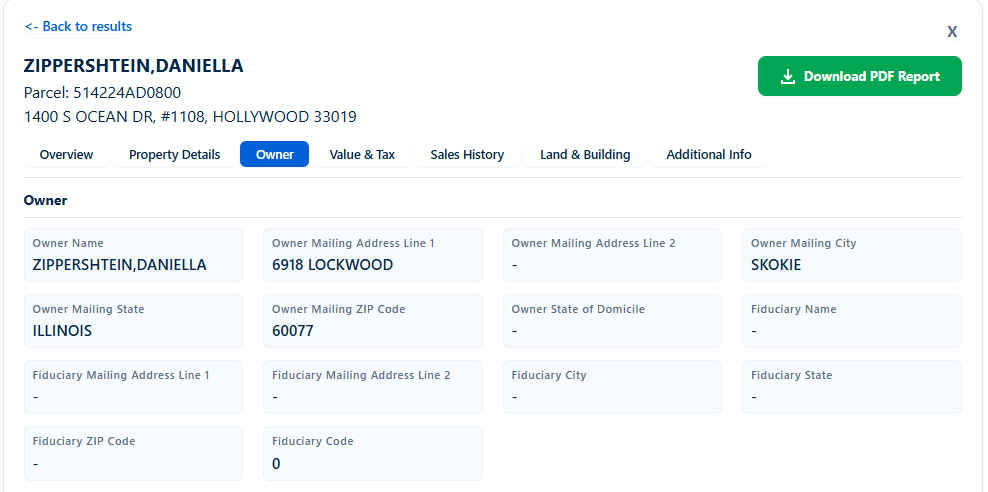
When you search for a property, the report displays complete property information rather than ownership details alone. To focus specifically on ownership records, click the Owner option in the report and switch to the owner category. This section contains 14 owner-related data points. If you are unsure what each field means, continue reading the explanations below.
1. Owner Name
Owner Name shows the name of the person or entity registered as the property owner in county records. For example, the report displays ZIPPERSHTEIN, DANIELLA, where the last name appears before the first name. Sometimes this field may be missing because of incomplete records or differences in county data. You can use this information to identify the registered owner and compare ownership details with other public records.
2. Owner Mailing Address Line 1
Owner Mailing Address Line 1 displays the primary street address where property-related correspondence is sent to the owner. For example, the report shows 6918 LOCKWOOD. This address may be different from the property’s physical location because an owner can live somewhere else. If this field is missing, the county may not have a complete mailing address on record. You can use it to identify where the owner receives property tax notices and other official correspondence.
3. Owner Mailing Address Line 2
Owner Mailing Address Line 2 contains additional mailing address information, such as an apartment number, unit number, suite, or building designation. In this example, the report displays a dash (-), meaning no additional address information is available in this field. It may be missing because the owner does not have a second address line or the county record does not include one. You can use it when verifying a complete mailing address.
4. Owner Mailing City
Owner Mailing City identifies the city associated with the owner’s mailing address. In the example, the report displays SKOKIE. This helps you understand where the property owner receives official correspondence, even if the property itself is located in a different Florida city. This field may be missing when mailing address information is incomplete or unavailable in county records. You can use it to distinguish the owner’s mailing location from the property’s actual location.
5. Owner Mailing State
Owner Mailing State identifies the state where the owner’s mailing address is located. In this report, the state is ILLINOIS, showing that the property owner receives correspondence outside Florida. Sometimes this field is missing because the mailing address is incomplete or the county data does not contain state information. You can use this detail to determine whether an owner has an out-of-state mailing address when reviewing Florida property records.
6. Owner Mailing ZIP Code
Owner Mailing ZIP Code displays the postal ZIP code associated with the owner’s mailing address. The example shows 60077, which belongs to the mailing location in Skokie, Illinois. This information may be missing when the county record does not contain a complete mailing address or ZIP code. You can use it to verify the owner’s mailing location, distinguish between similarly named cities, and identify the correct postal area for correspondence.
7. Owner State of Domicile
Owner State of Domicile identifies the state recorded as the property owner’s primary legal domicile. It is different from the mailing state because an owner may receive mail at an address that does not represent their legal domicile. This field may be missing when the owner has not provided this information or the county dataset does not include it. You can use it to review the owner’s recorded domicile information when available.
8. Fiduciary Name
Fiduciary Name identifies the person or entity acting in a legal or representative capacity for the property owner, such as an executor, trustee, or personal representative. A dash (-) in this field means the report does not display a fiduciary name. This information may be missing because no fiduciary is recorded or the county dataset does not provide it. You can use it to identify a representative when property ownership involves an estate or trust.
9. Fiduciary Mailing Address Line 1
Fiduciary Mailing Address Line 1 displays the primary street address associated with the fiduciary responsible for representing the property owner. This may be different from both the property’s location and the owner’s mailing address. The field may show a dash (-) when no fiduciary address is recorded or the county does not provide this information. You can use it to identify the representative’s mailing location when reviewing properties managed through an estate, trust, or other fiduciary arrangement.
10. Fiduciary Mailing Address Line 2
Fiduciary Mailing Address Line 2 contains additional address information for the fiduciary, such as an apartment, suite, office, or unit number. In the example, this field displays a dash (-), indicating that no second address line is available in the report. It may be missing because the fiduciary has no additional mailing address details or the county record does not include them. You can use it when checking or verifying the fiduciary’s complete mailing address.
11. Fiduciary City
Fiduciary City identifies the city associated with the mailing address of the person or entity acting as the property’s fiduciary. This helps distinguish the representative’s location from the property owner’s mailing city and the property’s physical location. The field may be missing when fiduciary information is not recorded or available in the county dataset. You can use it to understand where the property’s legal representative receives official correspondence.
12. Fiduciary State
Fiduciary State shows the state associated with the fiduciary’s mailing address. It helps you determine whether the person or entity representing the property owner is located in Florida or another state. This field may display a dash (-) when no fiduciary is recorded, the mailing address is incomplete, or the county does not provide this information. You can use it to review the representative’s recorded mailing location when dealing with estate or trust-related properties.
13. Fiduciary ZIP Code
Fiduciary ZIP Code displays the postal ZIP code associated with the fiduciary’s mailing address. It works alongside the fiduciary city and state to identify the representative’s mailing location more accurately. This field may be missing when the county does not have a complete fiduciary address or the information is not included in its records. You can use it to verify the representative’s mailing details when reviewing ownership records involving a fiduciary.
14. Fiduciary Code
Fiduciary Code is a numerical classification field used in the county’s property data to identify or categorize fiduciary-related information. In this example, the report displays 0. The exact meaning of this number depends on the county’s data definitions, so it should not automatically be interpreted as the absence of a fiduciary. You can use this code when comparing ownership records or reviewing additional county property data.
Conclusion
Finding property ownership information in Florida becomes easier when you know where to search and how to understand the available records. With FL Parcel Point, you can search properties across all 67 Florida counties using different search options and access the Owner section within the property report. Whether you are researching a property before buying, checking public ownership records, or looking for information about a particular property, this guide helps you understand how to use the tool and review the available ownership information.
Frequently Asked Questions
1. Can I search for a property owner without knowing the property address?
Yes. You do not always need a complete property address to find ownership records. FL Parcel Point provides multiple search options, including Owner Name and Parcel Number. If you already know the owner’s name or the property’s parcel identification number, you can use that information to search for the relevant property in the selected Florida county.
2. Can I find property owners in all 67 Florida counties using FL Parcel Point?
Yes. FL Parcel Point provides property search tools for all 67 Florida counties. You can visit the relevant county page and use its search tool to look up available property records. The search process follows the same general approach across counties, although the available public records and data fields may differ depending on the county.
3. Can I find out if a property has multiple owners?
You can review the ownership information available in the property report to check whether more than one owner is listed. However, the way additional owners appear depends on how the county records the ownership. If you need to confirm the complete legal ownership of a property, you should also review the relevant official county property records and recorded documents.
4. Why does my property search show multiple results?
Multiple results can appear when your search information matches more than one property. For example, different properties may have similar owner names, the same street name, or matching ZIP codes. To find the correct property, compare the available property information and narrow your search using a more specific option, such as the parcel number or complete property address.
5. Are Florida property ownership records public information?
Yes. Florida property ownership information is generally available through public records maintained by county property appraisers and other government offices. However, certain information may be restricted or unavailable depending on applicable privacy laws and record exemptions. FL Parcel Point helps users access available property information without having to search each county website separately.