
Florida property records contain legal and historical information that helps you understand how a property is identified and whether certain homestead-related assessment details are recorded. FL Parcel Point makes these records accessible across all 67 Florida counties. If you are unsure what a property’s legal description means or why previous homestead information appears in its report, this guide explains each available field and how you can use it.
How to Find Property Legal Records in Florida
To find legal information about a property, first visit its relevant Florida county page on FL Parcel Point and open the property search tool. You can search using the owner’s name, property address, parcel number, ZIP code, or city. If you have additional information, you can also use Advanced Search to narrow down the results.

Once you find the correct property, open its report and look for the Legal & Additional section. This is where you can review the property’s short legal description and available information related to previous homestead records and assessment difference transfers.
What Information Is Available in the Legal Records Section?
The Legal & Additional section contains six fields related to the property’s legal description and homestead assessment history. These fields help you understand the property’s recorded description and identify whether information about a previous homestead or transferred assessment difference is available. The information shown can vary from one parcel to another, so your report may display different values depending on the property’s records. Below, we explain all six fields separately.
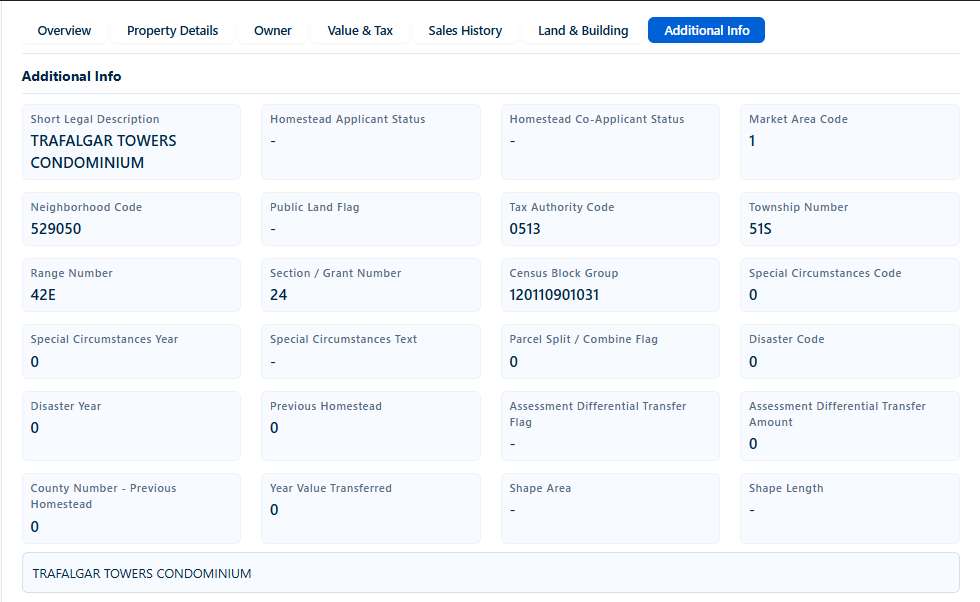
6 Legal Records Fields Explained
1. Short Legal Description
Short Legal Description provides a brief description used to identify the property in legal and property assessment records. Unlike a regular street address, it may refer to a subdivision, condominium, lot, block, or another recorded property description. For example, a report may display a condominium name or subdivision reference. You can use this information when comparing property records or checking a property’s legal identification against relevant recorded documents.
2. Previous Homestead
Previous Homestead indicates a recorded value associated with the property’s previous homestead information. This field is particularly relevant when reviewing properties with historical homestead assessment records. Its displayed value may vary depending on the available county data, and a dash or numerical value should not automatically be interpreted as proof of current homestead eligibility. You can use it as a starting point when researching previous homestead-related property information.
3. Assessment Differential Transfer Flag
Assessment Differential Transfer Flag indicates whether a recorded flag related to the transfer of an assessment difference is present in the property data. In Florida, eligible homeowners may transfer a qualifying homestead assessment difference from a previous homestead to a new one under the state’s portability provisions. The field may be blank when no value is supplied. You can use it to identify records that may require further review of homestead portability information.
4. Assessment Differential Transfer Amount
Assessment Differential Transfer Amount displays a recorded amount associated with an assessment difference transferred from a previous homestead, when available. Florida’s portability provisions allow eligible homeowners to transfer a qualifying assessment difference to a new homestead, subject to applicable requirements. The report may show a numerical amount, zero, or no value depending on the available record. You can use this field to review recorded transfer information, but it should not be treated as a current tax bill or guaranteed tax saving.
5. County Number – Previous Homestead
County Number – Previous Homestead identifies the county code associated with the previous homestead record, when that information is available. It is a numerical reference rather than the actual county name. Its value can differ depending on the property’s recorded history, and it may be unavailable if the source record does not contain the previous county reference. You can use it to investigate which county’s records may contain additional information about the property’s previous homestead.
6. Year Value Transferred
Year Value Transferred identifies the year associated with a recorded assessment value transfer from a previous homestead. This information can help you understand when the transfer was recorded in the available property data. The field may display different years, zero, or no value depending on the parcel’s records and data availability. You can use it when reviewing historical homestead assessment information and comparing records from different assessment periods.
Conclusion
Reviewing legal property records helps you understand more than just where a property is located. The Legal & Additional section in FL Parcel Point provides information about legal descriptions and previous homestead assessment records across all 67 Florida counties. By understanding these six fields, you can better review the information available for a parcel, investigate its historical homestead details, and identify when additional verification from official county records may be necessary.
Frequently Asked Questions
1. Is a short legal description the same as a property’s street address?
No. A street address tells you where a property is physically located, while a short legal description provides a legal reference used in property records. It may identify a subdivision, condominium, lot, or another recorded property description. Both details serve different purposes and can be useful when researching the same property.
2. Can I find the original deed or a copy of the property title in this section?
The Legal & Additional section displays property description and homestead-related assessment information. It does not necessarily provide a downloadable deed, title document, or complete legal ownership history. If you need an official deed or recorded instrument, check the appropriate county Clerk of Court or official records office.
3. What is Florida Homestead Portability?
Florida Homestead Portability allows eligible homeowners to transfer all or part of their qualifying Save Our Homes assessment difference from a previous homestead to a new Florida homestead. The transfer is subject to eligibility requirements and applicable limits. The Florida Department of Revenue provides official guidance about this process.
4. Does a previous homestead record mean the property currently has a Homestead Exemption?
No. Previous homestead information relates to historical property records and does not independently confirm that the current owner qualifies for or receives a Homestead Exemption. To verify the current exemption status, check the applicable county property appraiser’s records.
5. Where can I verify the official legal description of a Florida property?
You can check the official property records maintained by the county Property Appraiser and the recorded documents available through the county Clerk of Court. Compare the legal description in your FL Parcel Point report with the relevant official records if you need to verify the property’s recorded description for a transaction or legal purpose.